Metadata-Version: 2.4
Name: YnExchangePY
Version: 6.0.2
Summary: OpenSource Crypto Library
Author: Yasha Najafi(YN)
Author-email: najafiyasha@gmail.com
License: MIT
Keywords: python,crypto,prices,crypto calculations,api,calculations,metal
Description-Content-Type: text/markdown
Requires-Dist: bs4
Requires-Dist: plotly
Requires-Dist: matplotlib
Requires-Dist: mplfinance
Requires-Dist: ccxt
Requires-Dist: ccxt
Requires-Dist: pandas
Requires-Dist: urllib3
Requires-Dist: asyncio
Requires-Dist: aiohttp
Dynamic: author
Dynamic: author-email
Dynamic: description
Dynamic: description-content-type
Dynamic: keywords
Dynamic: license
Dynamic: requires-dist
Dynamic: summary
# YN Exchange
# Documentation
### Description:
This Python library provides functionalities to get cryptoCurrency prices and perform conversions between Iranian Toman (IRT) and USD, for all supported cryptocurrencies.
### Key Features:
* Real-time cryptoCurrency price data retrieval .
* Support for multiple exchanges .
* Perform conversions between USD, IRT, and supported cryptocurrencies.
* Get the current price of metals ( Gold , Copper , Silver and ... ) .
* Get the current price of natural resources ( oil , gas and ... ) .
* Generate cryptoCurrency tables (requires `kaleido` library for table rendering).
* Asynchronous data fetching .
* Customizable data formats .
* Save data to cache .
* Smart calculator
### Installation:
- Install the library using pip:
```bash
pip install YnExchangePY
```
### Dependencies
- Required: `kaleido` library for generating crypto tables ( Images )
```bash
pip install kaleido
```
# Usage ( Normal Version )
## Crypto Section :
- Get Crypto Price :
```python
# Import to your project :
from YN_Exchange import Exchange
# "Cache" Argument It is set to "False" by default
# "Cache_Duration" it is set to per second
ExchangeOBJ = Exchange.CryptoManager(Cache = True , Cache_Duration = 300) # Make object of CryptoManager
# "Currency" Argument supported Currency is : USD , IRT ( Default : USD )
# "Grouping" It is set to "False" by default
# Grouping ( False ) Output : 96000
# Grouping ( True ) Output : 96,000
BTC_Price = ExchangeOBJ.GetCryptoPrice(CryptoName = "BTC",Currency = "USD",Grouping = True) # Get crypto price
```
If the Cache is active, the information is received and displayed from the Cache until the Cache_Duration expires, and after the Cache expires, the information is received from the server again and stored in the Cache.
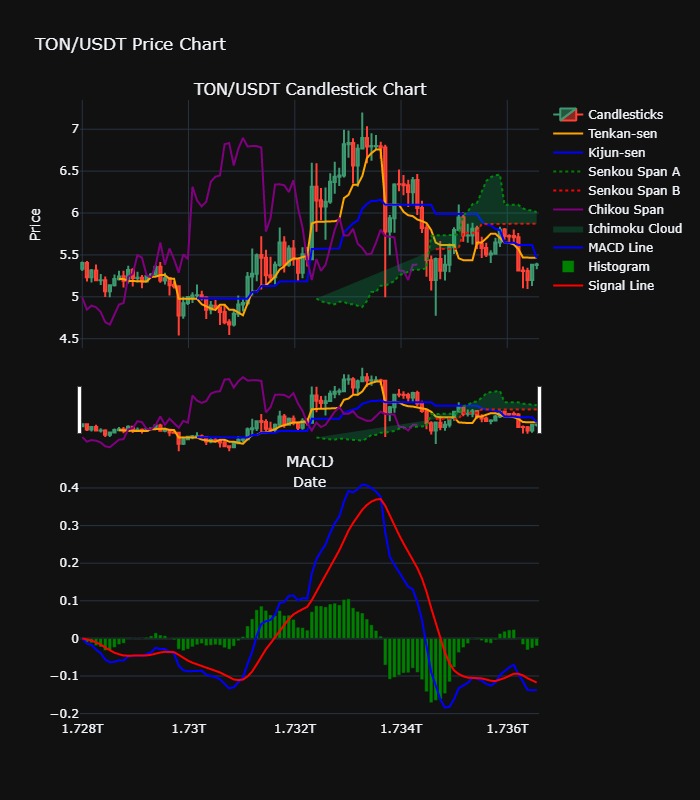
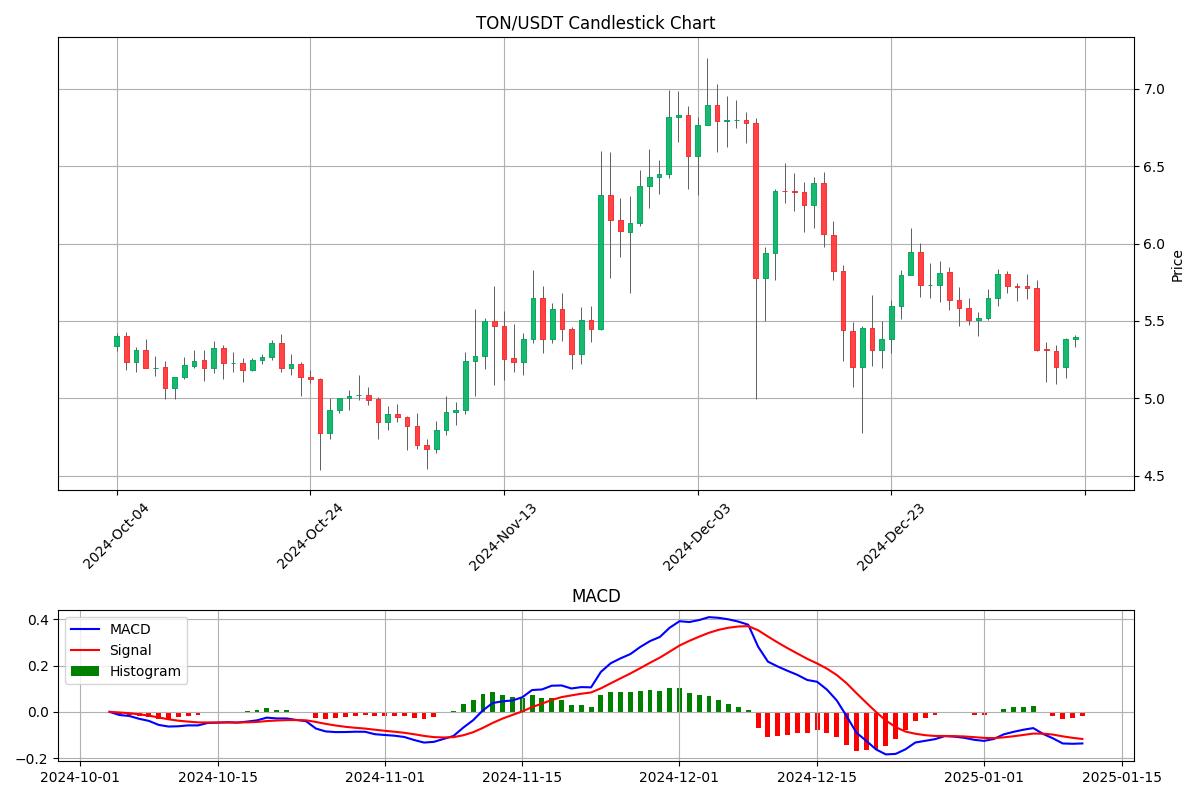
- Generate Crypto Charts :
### Examples :
### Example usage :
```python
# Import to your project :
from YN_Exchange import Exchange
# "Cache" Argument It is set to "False" by default
# "Cache_Duration" it is set to per second
# Cache not active for charts
ExchangeOBJ = Exchange.CryptoManager(Cache = True , Cache_Duration = 300) # Make object of CryptoManager
# Generate chart
# For save chart as image definitely install kaleido
# You can edit argument for edit your chart for example, if you set the histogram argument to "False", the histograms will be removed from the chart.
ExchangeOBJ.GenerateCryptoChart(CryptoSymbol = "TON/USDT)
```
You can edit argument for edit your chart for example, if you set the histogram argument to "False", the histograms will be removed from the chart.
For save chart as image definitely install kaleido ( [Click](#installation) )
### Charts Argument :
- ```ImageSave : bool = True```
- ```HTML_Save : bool = False```
- ```Json_Save : bool = False```
- ```ChartTemplate : str = "Professional"```
- ```Exchange : str = "binance"```
- ```CryptoSymbol : str = "BTC/USDT"```
- ```Limit : int = 100```
- ```Timeframe = '1d'```
- ```IchimokuLine : bool = True```
- ```IchimokuCloud : bool = True```
- ```Candlesticks : bool = True```
- ```Chikou : bool = True```
- ```Tenkan : bool = True```
- ```Kijun : bool = True```
- ```MACD_Line : bool = True```
- ```SignalLine : bool = True```
- ```Histogram : bool = True```
You can customize your charts with arguments
## Metal Section :
- Get Price :
```python
# Import to your project :
from YN_Exchange import Exchange
# "Cache" Argument It is set to "False" by default
# "Cache_Duration" it is set to per second
MetalsOBJ = Exchange.MetalManager(Cache = True , Cache_Duration = 300) # Make object of MetalManager
GoldPrice = MetalsOBJ.GetGoldPrice(Carat=24,Grouping=True)
```
You will see the rest of the functions of this class
### Functionality :
- ```GetPlatinumPrice(Grouping : bool = "False")``` Ounce per USD
- ```GetSilverPrice(Grouping : bool = "False")``` Ounce per USD
- ```GetPalladiumPrice(Grouping : bool = "False")``` Ounce per USD
- ```GetTinPrice(Grouping : bool = "False")``` Tonne per USD
- ```GetZincPrice(Grouping : bool = "False")``` Tonne per USD
- ```GetNickelPrice(Grouping : bool = "False")``` Tonne per USD
- ```GetLeadPrice(Grouping : bool = "False")``` Tonne per USD
- ```GetCopperPrice(Grouping : bool = "False")``` Pound per USD
- ```GetAluminiumPrice(Grouping : bool = "False")``` Tonne per USD
- ```GetGoldPrice(Grouping : bool = "False",carat : int = 18,weight : str = "gram")``` Weight : [kilo,gram,ounce] and Only IRT Price
## Natural Resources Section :
- Get Price :
```python
# Import to your project :
from YN_Exchange import Exchange
# "Cache" Argument It is set to "False" by default
# "Cache_Duration" it is set to per second
NaturalOBJ = Exchange.NaturalResourcesManager(Cache = True , Cache_Duration = 300) # Make object of NaturalResourcesManager
BrentOil = NaturalOBJ.GetBrentOil(Grouping = True)
OilWTI = NaturalOBJ.GetCrudeOilWTI(Grouping = True)
NaturalGas = NaturalOBJ.GetNaturalGas(Grouping = True)
```
### Functionality :
- ```GetCrudeOilWTI``` Barrel per USD
- ```GetBrentOil``` Barrel per USD
- ```GetNaturalGas``` Mmbtu per USD
## Calculator Section :
You can use this functions in ```Calculator()``` class
- Example usage code :
```python
# Import to your project :
from YN_Exchange import Exchange
CalculatorOBJ = Exchange.Calculator() # Make object of Calculator
Result = CalculatorOBJ.CryptoValue2Currency(CryptoName="BTC",Currency="USD",Grouping = True)
```
### Functionality :
- ```CryptoValue2Currency(Value: int, CryptoName: str = "BTC", Currency: str = "USD", Grouping: bool = False)```
- ```Currency2CryptoValue(Value: int, CryptoName: str = "BTC", Currency: str = "USD", Grouping: bool = False)```
- ```CryptoValue2CryptoValue(CryptoValue: int, CryptoName1: str = "BTC", CryptoName2: str = "ETH", Grouping: bool = False)```
- ```CryptoValue2GoldWeight(GoldCarat: int = 18, GoldWeight: str = "gram", CryptoName: str = "BTC")```
- ```GoldWeight2CryptoValue(GoldCarat: int = 18, GoldWeight: str = "gram", GoldValue: int = 1, CryptoName: str = "BTC")```
- ```GoldWeight2Currency(GoldCarat: int = 18, GoldWeight: str = "gram", GoldValue: int = 1, Currency: str = "USD")```
- ```Currency2GoldWeight(GoldCarat: int = 18, GoldWeight: str = "gram", CurrencyValue : int = 5000000)```
## Exchanges API Section :
A class to receive digital currency information from APIs of world's most prestigious exchanges
- Example usage code :
```python
# Import to your project :
from YN_Exchange import Exchange
ExchangeOBJ = Exchange.ExchangeAPI(Exchange = "binance") # Make object of ExchangeAPI
BTC = ExchangeOBJ.GetCryptoData(CryptoSymbol = "BTC/USDT")
```
- Output
```json
{'symbol': 'BTC/USDT', 'timestamp': 1736598300337, 'datetime': '2025-01-11T12:25:00.337Z', 'high': 95836.0, 'low': 92206.02, 'bid': 94613.99, 'bidVolume': 5.67459, 'ask': 94614.0, 'askVolume': 0.35323, 'vwap': 94125.84165815, 'open': 94805.6, 'close': 94614.0, 'last': 94614.0, 'previousClose': 94805.6, 'change': -191.6, 'percentage': -0.202, 'average': 94709.8, 'baseVolume': 25125.20063, 'quoteVolume': 2364930656.128506, 'markPrice': None, 'indexPrice': None, 'info': {'symbol': 'BTCUSDT', 'priceChange': '-191.60000000', 'priceChangePercent': '-0.202', 'weightedAvgPrice': '94125.84165815', 'prevClosePrice': '94805.60000000', 'lastPrice': '94614.00000000', 'lastQty': '0.03192000', 'bidPrice': '94613.99000000', 'bidQty': '5.67459000', 'askPrice': '94614.00000000', 'askQty': '0.35323000', 'openPrice': '94805.60000000', 'highPrice': '95836.00000000', 'lowPrice': '92206.02000000', 'volume': '25125.20063000', 'quoteVolume': '2364930656.12850630', 'openTime': '1736511900337', 'closeTime': '1736598300337', 'firstId': '4392795366', 'lastId': '4396948127', 'count': '4152762'}}
```
## Cache Section :
All the classes in the library have the "clear_cache" function, which you can use to clear the cache of that class.
Caches are saved as json files on your computer
# Usage ( Async Version ) :
For usage Async version you must import ```AsyncExchange``` module
And for usage you can use ```asyncio.run()``` function
- Example Usage :
```python
# Import to your project :
from YN_Exchange import AsyncExchange
import asyncio
# The use of all async functions is the same as the main functions :
ExchangeOBJ = AsyncExchange.AsyncCryptoManager(Cache = True , Cache_Duration = 300)
CryptoPrice = asyncio.run(ExchangeOBJ.GetCryptoPrice(CryptoName = "BTC",Currency = "USD",Grouping = True))
```
To use functions, you can easily use them by adding the word "async" to the first of the main functions.
# Donation
- TON , USDT Wallet ( Tonkeeper ) :
``` UQCZgyJ4XB7c1GMnLgefqcc-zOA98hyOlMLZpO0EsCNxBq-e ```
- BTC Wallet :
``` bc1qpgzy8hpklpp0zwan5ha4lfzavvtjf286w0tlzc ```
- ETH Wallet :
```0xE95FAEc8B847F18B3bC5dc1bB8256fb376d2e459```
- TRX Wallet :
```TG8MpYtysGngjK7tPdCATLqLJKwm5vbfYi```